Audit planning overview
Audit Planning in AssureGrid converts audit scope and control inputs into structured planning artifacts that teams can review, refine, and carry into execution.
At a glance
Generate the core audit planning artifacts needed before fieldwork begins.
RCM Generation, Test Step Generation, Evidence List Generation, and Walkthrough Questionnaire Generation.
Audit topic, audit memo, selected regulations or guidelines, and the control inventory.
A tailored RCM, risk-aligned test steps, evidence requests, and walkthrough questions.
What the Audit Planning module does
The Audit Planning module gives auditors a single workspace for producing the planning materials that normally require significant manual drafting and reconciliation. Instead of preparing each artifact independently, AssureGrid organizes planning into a guided sequence so that risk, control, testing, evidence, and walkthrough preparation stay connected.
From the user interface, auditors can review the audit topic, access the audit memo, and confirm the framework or regulatory requirements selected during setup. These shared inputs provide the context used to generate each planning output.
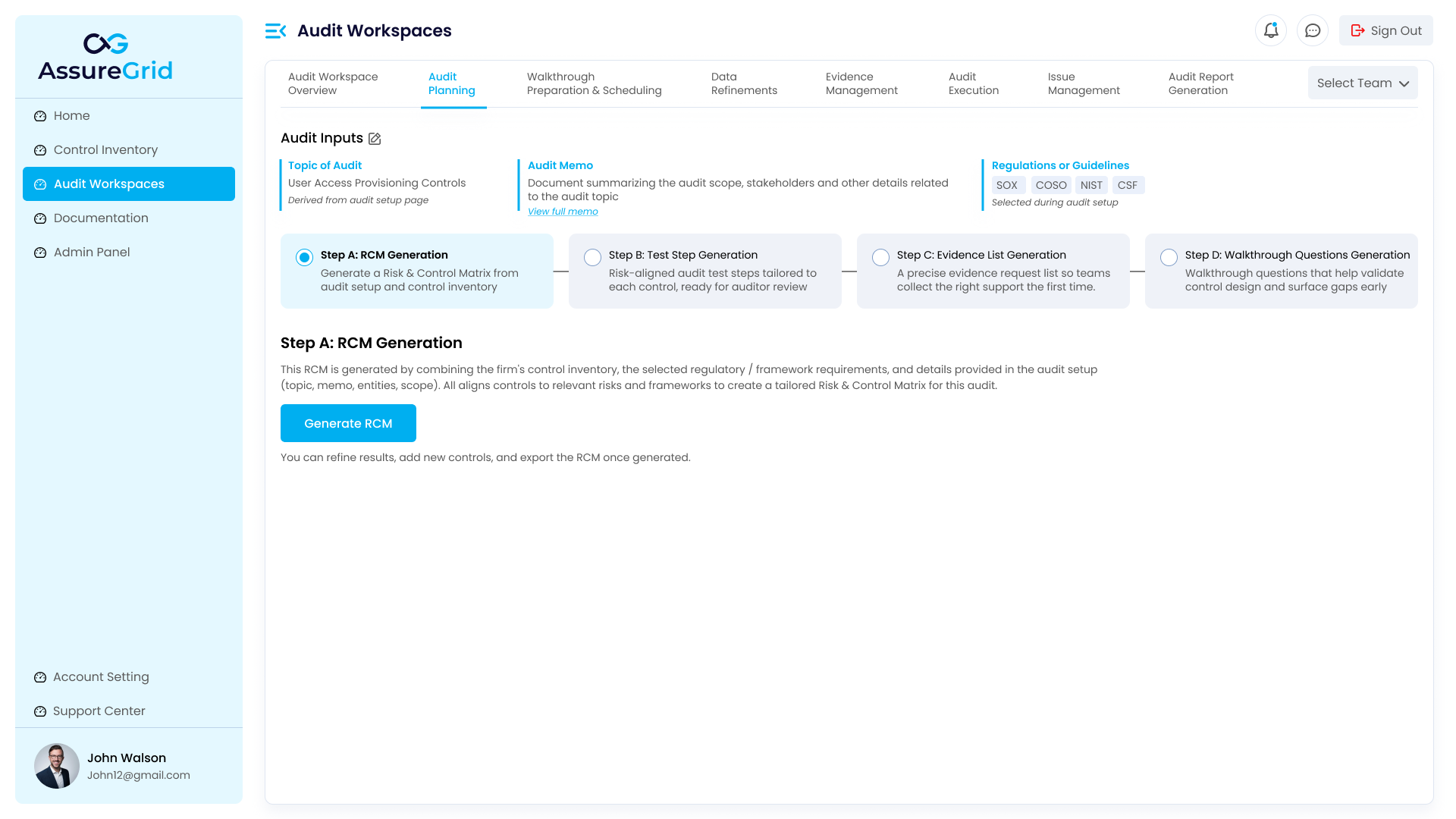
End-to-end planning workflow
| Step | What is generated | Why it matters |
|---|---|---|
| Step A: RCM Generation | A risk and control matrix tailored to the audit setup and control inventory. | Creates the base planning structure that links risks, controls, domains, and identifiers. |
| Step B: Test Step Generation | Detailed test procedures for the controls in scope. | Turns the RCM into execution-ready testing activities for auditor review. |
| Step C: Evidence List Generation | Evidence requests and acquisition instructions. | Clarifies what support must be collected to perform testing efficiently. |
| Step D: Walkthrough Questionnaire Generation | Walkthrough questions grouped for discussion and validation. | Helps teams validate design and understand how controls operate in practice. |
Shared interface elements
-
Audit Inputs section: Displays the topic of audit, the audit memo reference, and the regulations or guidelines selected during setup.
-
Step navigation ribbon: Shows the four planning stages and visually indicates the current step, completed steps, and upcoming steps.
-
Action buttons: Depending on the stage, users can access History, AI Assist, Download, Save & Next, or Submit actions.
-
Editable tables: Generated planning outputs are displayed in table form so that teams can review, refine, and move forward with confidence.
Processing queue and asynchronous generation
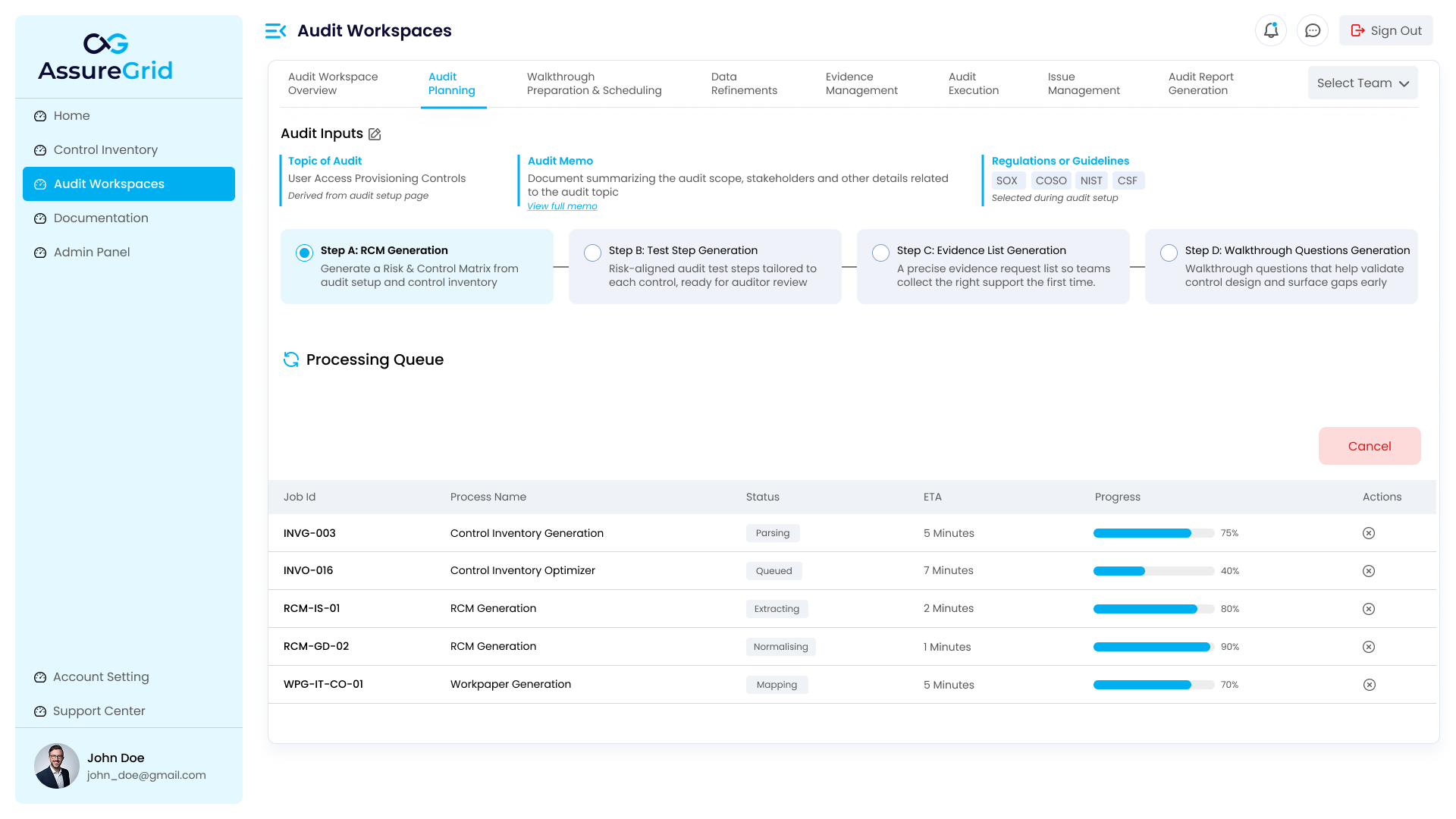
Generation activities do not need to be treated as a black box. AssureGrid surfaces processing status through a queue that shows job identifiers, process names, status labels, estimated completion time, progress bars, and available actions. This gives users visibility into what is running and helps them understand whether a step is queued, parsing, extracting, normalising, mapping, or otherwise in progress.
The queue is especially useful in environments where multiple generation jobs may be running at the same time across inventory creation, optimization, planning, or workpaper preparation. Users can confirm completion status before expecting downstream outputs to be available.
How teams should work through planning
-
Confirm the audit inputs are complete and reflect the intended scope.
-
Generate and review the RCM before moving to downstream steps.
-
Use the reviewed RCM to refine test steps and confirm they are specific enough for execution.
-
Review the evidence list to make sure it is practical, complete, and actionable for request management.
-
Use walkthrough questions to prepare for discussions with control owners and process stakeholders.
Best practice: Use Save & Next only after reviewing the current step for completeness and consistency. The strongest planning packages come from deliberate step-by-step review, not from treating generation as fully automatic.
Outputs produced by Audit Planning
By the end of the module, the audit team has a planning package that can move directly into execution. The final result is not just a collection of generated tables, but a connected planning trail that explains what is in scope, what risks and controls are being addressed, how testing should be performed, what evidence should be obtained, and what questions should be asked during walkthroughs.
-
Risk and Control Matrix for the audit in scope.
-
Test steps aligned to the controls and related risks.
-
Evidence request list and acquisition instructions.
-
Walkthrough question set to support discussion and validation.