Issue management overview
How AssureGrid converts workpaper observations into structured issue records, maps them to related controls and risks, and guides users through ownership, closure, and attestation activities.
Overview
Issue Management is the module where AssureGrid organizes audit issues into a structured table after observations have been synthesized from workpapers. The purpose of this view is to make issue review operational: users can inspect each issue in context, confirm how it maps back to the relevant control and risk, and complete the ownership and timing fields needed for downstream follow-up.
Because issue logs often become an important reporting and remediation artifact, this module serves as more than a simple list. It gives teams a shared workspace for validating issue quality, assigning accountability, checking closure expectations, and confirming that the issue log is ready for handoff, reporting, or attestation.
Layout and key components
The Issue Management screen is organized as a working table inside the Audit Workspaces flow.
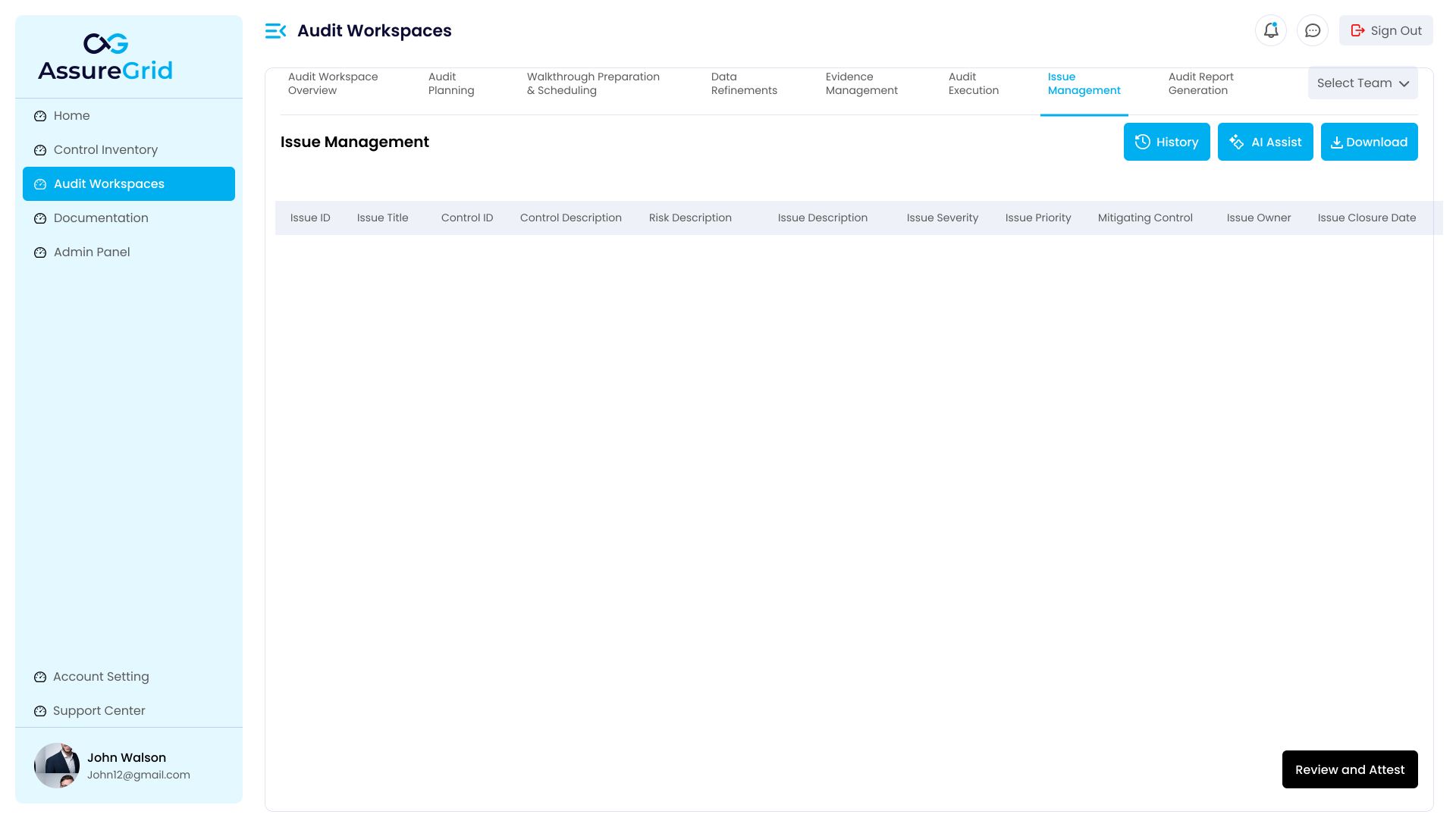
What users see in the issue table
| Field or area | How it is used |
|---|---|
| Issue ID and Issue Title | Provide the identifying reference and short name for the issue record. |
| Control ID and Control Description | Show which control the issue is tied to so reviewers can confirm the issue is mapped to the correct control context. |
| Risk Description | Connects the issue to the related risk narrative that explains why the finding matters. |
| Issue Description | Captures the issue statement itself and serves as the core record to review and refine. |
| Issue Severity and Issue Priority | Support triage and follow-up by indicating how serious the issue is and how urgently it should be addressed. |
| Mitigating Control | Provides space for documenting offsetting control context where relevant. |
| Issue Owner | Allows users to tag the responsible control owner or accountable party. |
| Issue Closure Date | Lets users define the expected closure timeline for tracking and remediation. |
Actions available in Issue Management
The action buttons in the upper-right corner support common review and operational tasks. Together they help users inspect issue evolution, refine wording, export the current issue output, and complete the final review checkpoint.
| Action | Purpose |
|---|---|
| History | Helps users review how issue content or state has evolved over time, which is useful when validating recent edits or changes in ownership and closure expectations. |
| AI Assist | Supports refinement of issue descriptions or related wording so users can improve clarity, consistency, and readability before saving the final issue content. |
| Download | Exports the current issue output for offline review, sharing, or reporting preparation. |
| Review and Attest | Opens the final review checkpoint where the user can confirm the issue log has been reviewed, add notes if needed, and save the attestation. |
Recommended working pattern
-
Review synthesized issues Start by checking that each issue row accurately reflects the observation derived from workpaper activity and that the issue is mapped to the expected control and risk.
-
Validate issue wording Confirm that the issue description is clear, actionable, and aligned to the severity and priority shown in the row.
-
Complete ownership and timing Tag the appropriate issue or control owner and set the issue closure date so the record can support remediation follow-up.
-
Use supporting actions where needed Open history when you need context on earlier edits, and use AI Assist when the issue wording needs clarification or refinement.
-
Download or attest at the right stage Download the issue output when you need an offline artifact, and use Review and Attest only when the visible issue log reflects the intended final reviewed state.
Review and attestation
Issue Management includes a final review and attestation step to confirm that the issue log has been examined before the user saves the checkpoint. This step is especially important when the issue log is being prepared for reporting, governance review, or a formal workflow handoff.
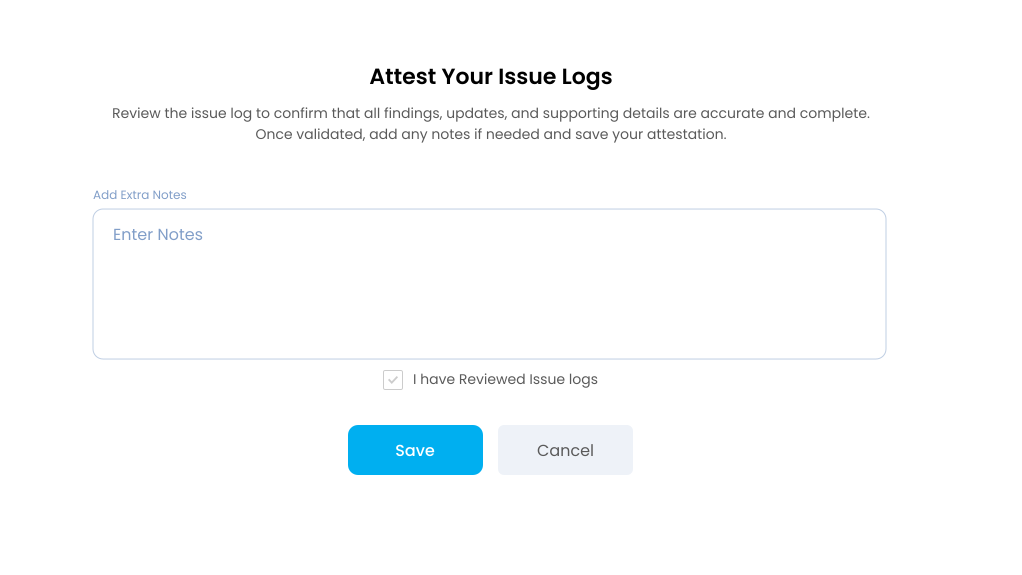
What happens in the attestation step
-
Users can add extra notes to document any important context about the issue log review.
-
The review checkbox acts as the explicit confirmation that the issue log has been reviewed.
-
Saving the attestation records the user acknowledgement.
-
Attestation should be treated as a deliberate checkpoint and not as a substitute for earlier review of issue quality, ownership, or closure timing.
Best practices and common misunderstandings
-
Review issue rows in context before assigning owners or dates so accountability is attached to the correct issue record.
-
Use severity and priority as review signals, but confirm that the narrative in the issue description supports those labels.
-
Set closure dates only after checking that the issue has a clear owner and a realistic remediation timeline.
-
Use AI assistance to strengthen wording or consistency, but still review the final saved issue text manually.
-
Download the issue output only after confirming that the visible rows and recent edits match the intended reviewed state.