Step D — Walkthrough questions generation
Walkthrough Questionnaire Generation creates structured questions that help auditors validate control design, understand process operation, and prepare for conversations with stakeholders.
At a glance
Generate walkthrough questions that support validation of control design and operation.
Reviewed planning outputs from the earlier audit planning steps.
Questionnaire sections and item IDs linked to controls.
Well-structured walkthrough questions improve interviews, surface gaps earlier, and strengthen audit understanding.
Purpose of Walkthrough Questions
Step D helps auditors prepare for walkthrough conversations by generating targeted questions that are connected to the controls in scope. These questions are intended to guide discussions with process owners, clarify how a control operates in practice, and identify gaps between documented expectations and actual execution.
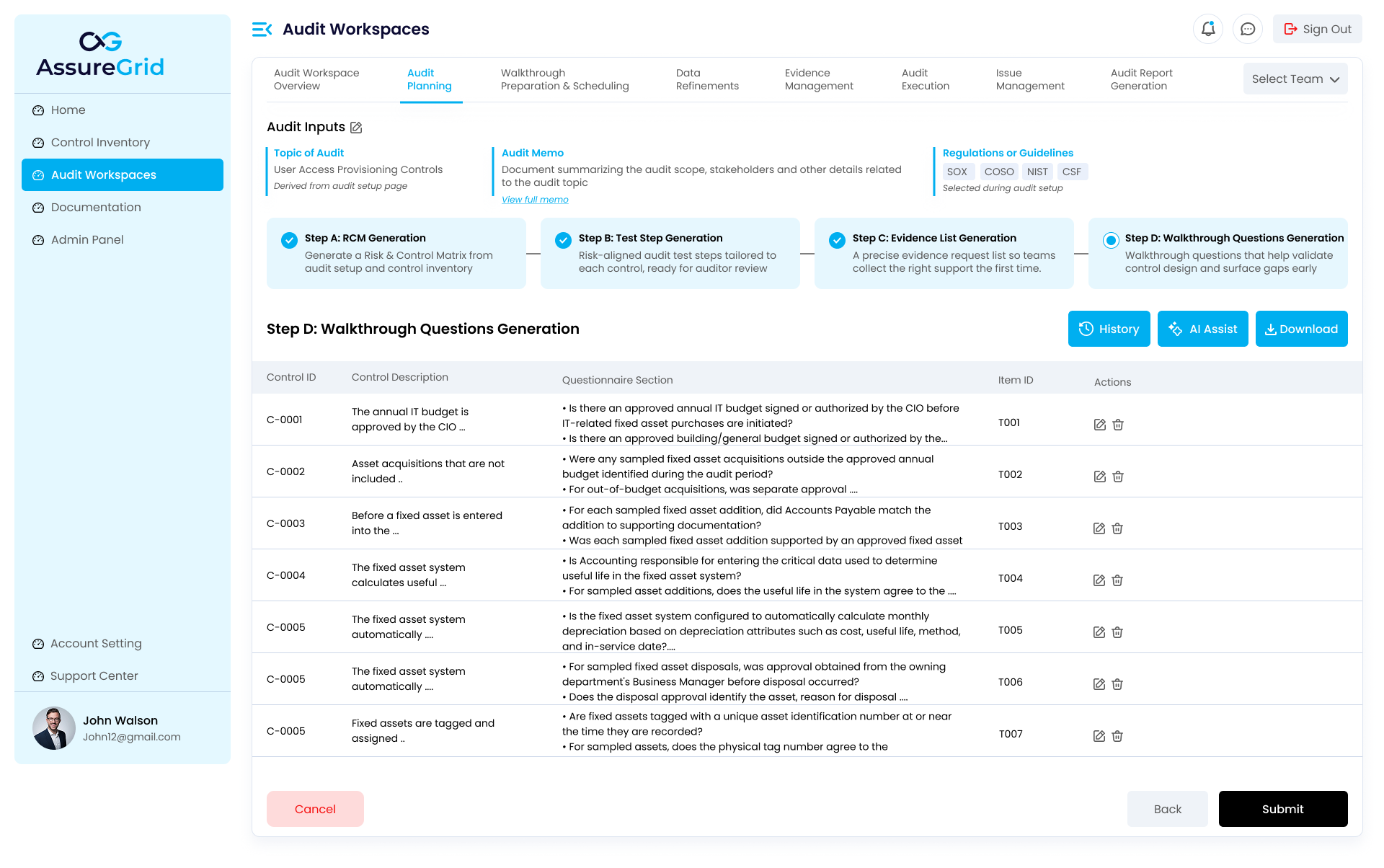
How the questionnaire is organized
The output is shown in a tabular format that links the control ID and control description to a questionnaire section and item ID. This structure helps teams track which questions belong to which controls and makes it easier to use the content consistently during meetings, walkthrough sessions, or validation exercises.
-
Control-linked questions improve traceability.
-
Questionnaire sections help group related prompts together.
-
Item IDs help track, reference, or export individual questions as needed.
-
Actions allow users to refine the generated content before submission.
What strong walkthrough questions do
| Outcome | Why it matters |
|---|---|
| Validate design | Confirms whether the intended control exists and has been designed appropriately. |
| Clarify execution | Explains how the process is actually performed in day-to-day operations. |
| Surface gaps | Highlights inconsistencies, missing approvals, or exceptions that may require follow-up. |
| Support readiness | Helps the audit team enter walkthrough meetings with focused, purposeful questions. |
Reviewing Step D before submission
-
Check that the questions are clearly worded and appropriate for the process owner audience.
-
Remove or refine questions that are duplicative or too generic to be useful.
-
Confirm that the questions collectively cover the core control design and execution themes.
-
Review the final set before using Submit to finalize the planning sequence.
How Step D supports the rest of the audit
The walkthrough questionnaire is often one of the most visible planning outputs because it is used directly in discussions with stakeholders. A strong output here improves process understanding, supports evidence validation, and helps the audit team identify issues before execution proceeds too far.
Submission note: Submit should be used after the final question set has been reviewed and is ready to serve as the working walkthrough guide for the engagement.