Step B — Test step generation
Test Step Generation converts the RCM into clear, risk-aligned audit procedures that can be reviewed, refined, and executed by the audit team.
At a glance
Create testing procedures for each control represented in the RCM.
A reviewed and saved RCM from Step A.
A table of controls with associated test procedures ready for auditor review.
High-quality test steps turn planning decisions into actionable fieldwork instructions.
Purpose of Test Step Generation
Step B takes the structure created in the RCM and translates it into testing activity. Rather than leaving auditors to manually draft each procedure from scratch, AssureGrid generates test steps that are aligned to the control description, related risk, and planning context already established in Step A.
The goal is not simply to produce more text. The goal is to produce procedures that are specific enough to guide execution, understandable to reviewers, and consistent across the audit.
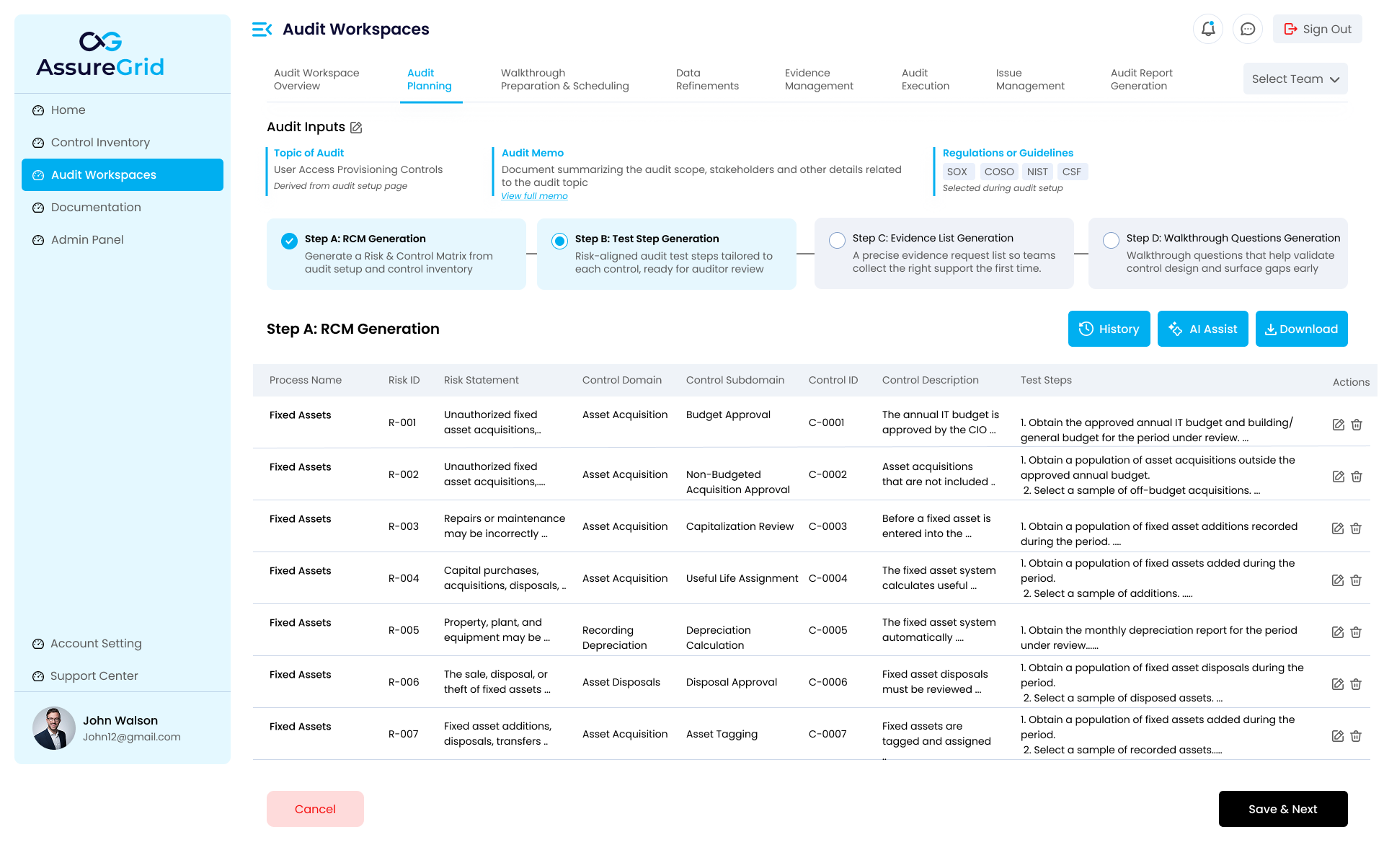
How Step B fits into the planning flow
-
Step A defines the risk and control structure.
-
Step B translates that structure into testing procedures.
-
Step C then uses those procedures to identify the evidence that needs to be requested or collected.
-
Step D prepares walkthrough questions that complement the procedures and evidence plan.
Reviewing generated test steps
The generated table in Step B allows users to review the relationship between the process, risk, control mapping, and the actual procedures that will be performed. The test step column is where auditors should spend most of their review effort, because this content directly shapes how execution workpapers will later be supported.
-
Check whether each procedure is responsive to the control being tested.
-
Confirm that steps are specific enough to be performed consistently by different auditors.
-
Look for procedures that are too generic, repetitive, or incomplete.
-
Verify that the procedure naturally leads to observable evidence or test results.
Actions and refinement options
Step B supports the same core working pattern visible in other planning stages. Users can review prior versions through History, use AI Assist to improve or clarify generated content, download the current output when needed, and save the reviewed version before progressing to the next stage.
AI-assisted review: When a procedure feels vague or overly broad, AI Assist can help refine wording or improve clarity. The user should still review and approve the final version before saving.
What strong test steps look like
| Characteristic | What to look for |
|---|---|
| Specific | The procedure states what population, sample, report, or action the auditor should examine. |
| Traceable | The test step clearly ties back to the control and related risk in the RCM. |
| Executable | Another auditor could perform the procedure without needing significant extra explanation. |
| Supportable | The procedure points naturally toward evidence that can be obtained and reviewed. |
Before selecting Save & Next
-
Confirm that each control has at least one meaningful testing procedure.
-
Resolve duplicate or redundant wording across rows where possible.
-
Make sure the procedures reflect the intended audit approach and not just generic boilerplate.
-
Check that the output is strong enough to support evidence identification in Step C.
-
After review is complete, Save & Next advances the planning flow to Evidence List Generation.