Control Inventory Optimization
Guide to refining an existing control inventory for better structure, wording, and coverage.
The Optimization workflow is used when a control inventory already exists but needs to be reviewed, strengthened, or normalized. In AssureGrid, optimization is not just a one-time transformation; it is a guided review process that combines structured results, AI assistance, and manual edits.
Control Inventory Optimization helps users take an existing inventory and improve it so the final output is more consistent, audit-ready, and easier to use downstream. This is especially valuable when the starting inventory was assembled manually, created in a different format, or requires clearer linkage between processes, risks, and controls.
Optimization at a glance
Improve an existing control inventory instead of creating a new one from scratch.
Clearer wording, better classification, reduced ambiguity, and stronger field completeness.
The post-inventory list provides the row-based structure for inspection and refinement.
AI chat for suggestions and manual row edits for precise control.
When to use optimization
-
An inventory already exists but contains inconsistent wording or formatting.
-
Control descriptions need to be tightened for audit readability.
-
Risk and control mapping needs clearer separation or alignment.
-
Domain, sub-domain, regulatory, or reasoning fields need to be filled or standardized.
-
Users want to improve a current inventory before it is used for planning, testing, or review.
Optimization workflow
The optimization path focuses on review and refinement rather than document ingestion. After the optimizer run is completed, users work from the resulting post-inventory list. Each row can be reviewed in context, and the inventory can be iteratively improved through a combination of AI-supported analysis and direct edits.
-
Start from an existing control inventory that requires refinement.
-
Run the optimization job and wait for processing to complete.
-
Open the post-inventory list to review the structured output row by row.
-
Use AI chat to ask for explanation, comparison, or refined wording for the current inventory.
-
Add new rows or edit existing rows where human judgment, missing detail, or offline information must be incorporated.
-
Finalize the optimized inventory once coverage, clarity, and structure are acceptable.
Reviewing the post-inventory list
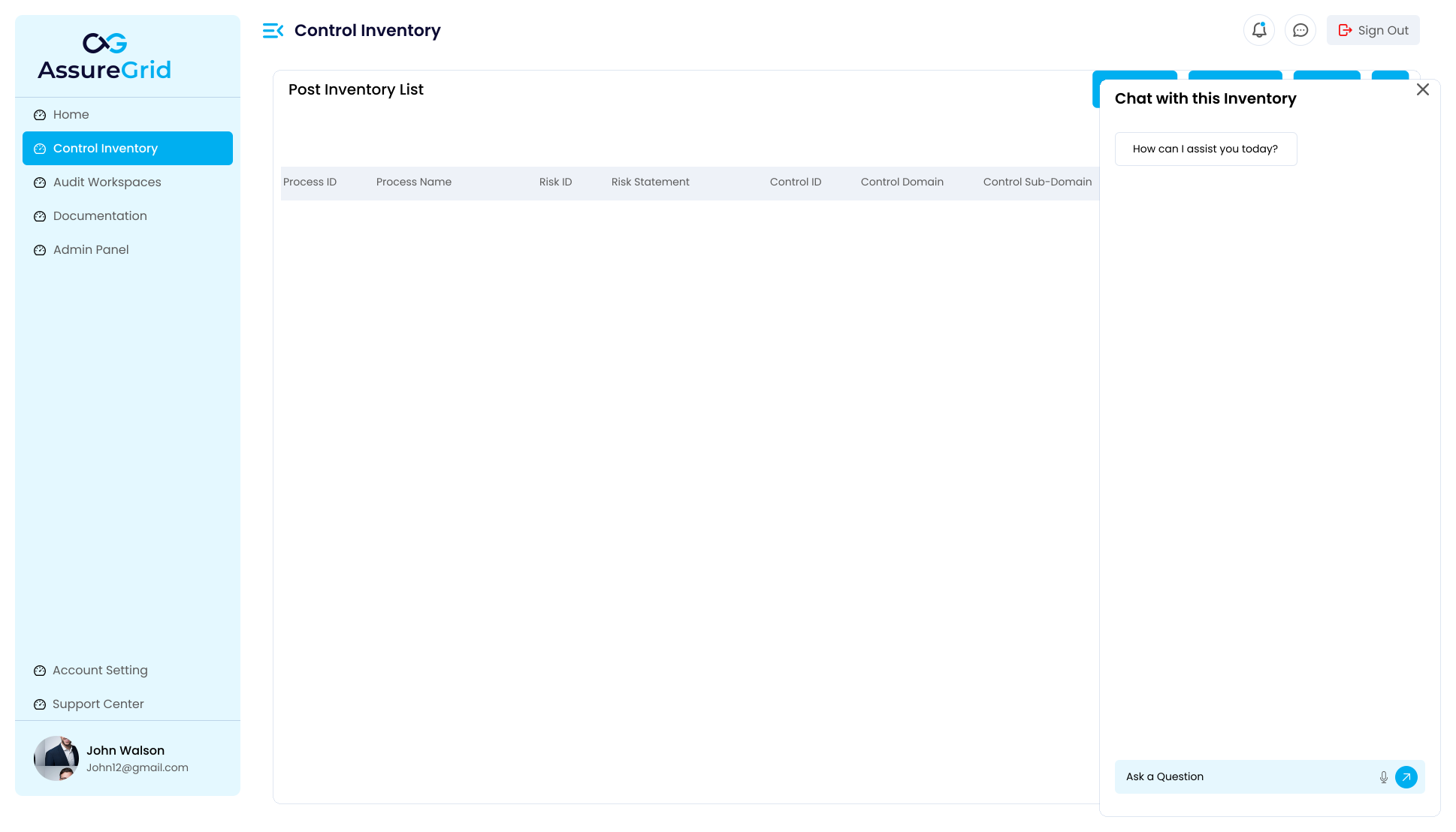
The post-inventory list is the central review surface for optimization. It exposes the inventory in a tabular structure so users can inspect whether each row is complete and usable. Based on the screenshot, the table includes process, risk, and control identifiers as well as descriptive and classification fields. This makes it easier to identify blank fields, overly broad statements, or rows that need stronger control articulation.
-
Check whether each process has a coherent risk statement and control mapping.
-
Verify that control descriptions are specific enough to support testing and later workpaper generation.
-
Review domain and sub-domain assignments to improve consistency across similar controls.
-
Use reasoning or regulatory fields where additional context is needed to explain why a row exists.
Using AI chat during optimization
The chat panel shown in the inventory review screen gives users a fast way to interact with the current results. AI chat is especially helpful when the inventory needs wording improvements or when a reviewer wants help understanding how a row should be interpreted. Users can ask for an explanation of a control, request a cleaner version of a risk statement, or use the conversation to compare alternative wording.
Recommended AI usage pattern: Ask the AI to explain or improve specific inventory content, then review the suggestion carefully before deciding whether to keep it, edit it further, or replace it manually.
-
Use explanation prompts when a row appears ambiguous or overly broad.
-
Use revision prompts when control or risk statements need better clarity or consistency.
-
Avoid treating the AI answer as final without checking that it still matches the intended business process and control design.
-
Use the chat panel iteratively; refinement is often more effective when done in small, targeted steps.
Manual row editing and row creation
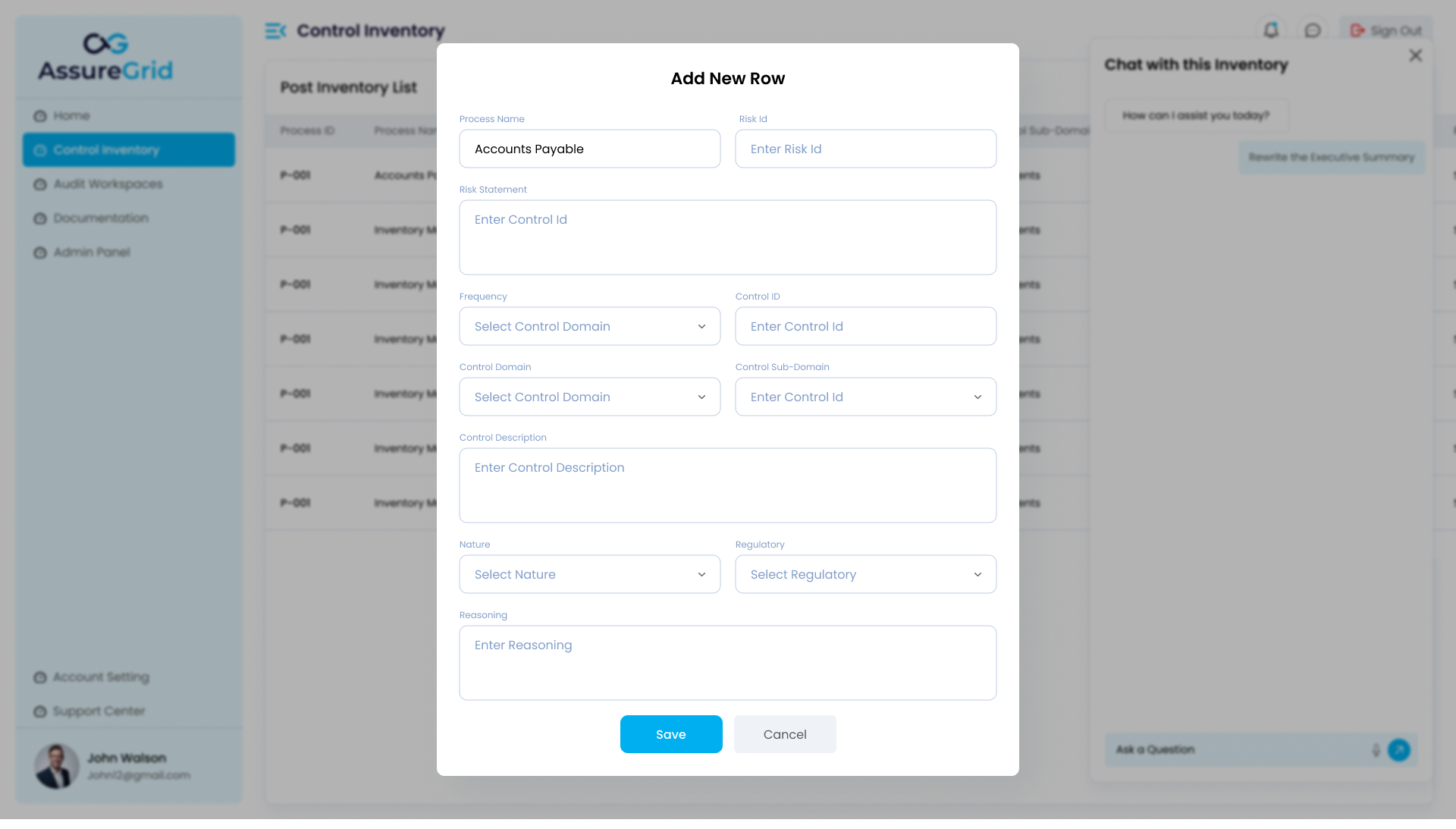
Optimization also supports hands-on editing for cases where structured human judgment is required. The Add New Row modal shows that users can directly populate fields such as Process Name, Risk ID, Risk Statement, Frequency, Control ID, Control Domain, Control Sub-Domain, Control Description, Nature, Regulatory, and Reasoning. This is important when optimization reveals missing controls, missing metadata, or language that must be precisely tailored.
| Field group | Why it matters during optimization |
|---|---|
| Process and risk fields | Keep business context and control rationale tied to the correct process area. |
| Control description fields | Improve wording so the control can be understood and tested later. |
| Classification fields | Domain, sub-domain, nature, and regulatory values support consistency and filtering. |
| Reasoning | Provides supporting explanation for how the row should be interpreted or why it was added. |
Frequently asked questions
Does optimization replace the need for user review?
No. Optimization helps improve the inventory, but the user is still responsible for deciding what final content should be retained.
Can I use AI chat and manual editing together?
Yes. AI chat is useful for explanation and wording support, while manual editing is best when exact control over the row structure is required.
What kinds of improvements should I expect from optimization?
Common improvements include clearer statements, stronger field completeness, more consistent taxonomy, and better readiness for downstream audit workflows.
Why would I add a new row during optimization?
A new row may be needed when the existing inventory is missing a control, when a control needs to be split into more precise records, or when offline business context needs to be captured.